
No-Code AI Voice Agent Builder: What You Actually Configure
What a no-code AI voice agent builder actually gives you, the six layers of an agent, how to evaluate a platform, and where no-code runs out.
By Ai Calling AgentPublished Updated
Building a voice agent from scratch is a hard engineering problem. You need telephony that does not drop calls, speech recognition fast enough that the pause does not feel awkward, a model that stays on task, and interruption handling that lets a caller cut in mid-sentence without the whole thing falling apart. Teams spend months on it.
A no-code AI voice agent builder exists because almost nobody needs to solve that problem twice. The hard parts are the same for a dental clinic and a logistics company. What differs is the conversation — and the conversation is exactly the part you should be spending your time on.
This article covers what these builders actually give you, the six layers of an agent and which ones you configure, where no-code runs out of road, and how to build something usable in an afternoon rather than a quarter.
What “No-Code” Actually Means Here
It is worth being precise, because the term gets stretched. A no-code voice agent builder does not mean the agent has no logic. It means the logic is expressed in a visual interface — prompts, flow diagrams, dropdowns and toggles — instead of in a codebase you have to deploy and maintain.
You still make every meaningful decision. What the agent says first, how it handles someone who says “I’m not interested,” which questions it must ask before booking, when it transfers to a human, what it writes back to your CRM. Those are product decisions, and they belong with whoever understands the business, not whoever knows Python.
What you give up is control over the plumbing. You do not choose the audio codec or tune the endpointing threshold. For the overwhelming majority of use cases, that is a trade worth making.
The Six Layers of a Voice Agent
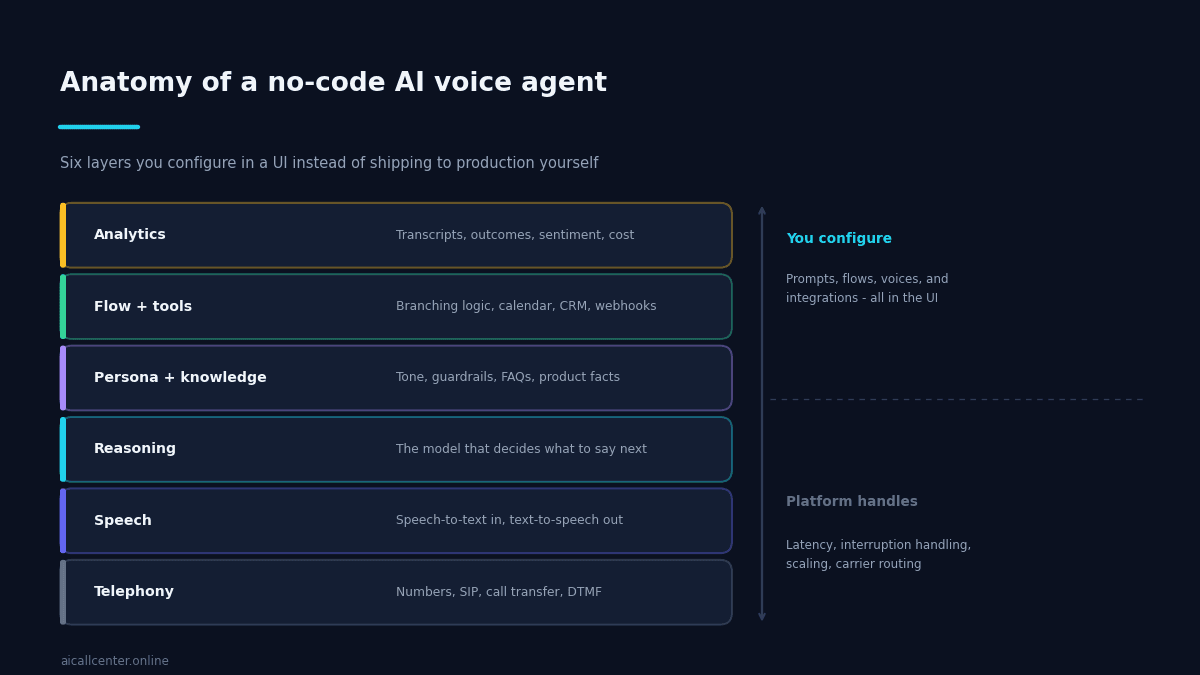
Every voice agent, built any way, has the same stack. Understanding it tells you exactly what a builder is doing for you.
Telephony handles numbers, carrier routing, call transfer and keypad input. Speech converts audio to text on the way in and text to audio on the way out. Reasoning is the model deciding what to say next. These three are infrastructure, and a builder should hide them entirely.
Persona and knowledge is where you start: the tone, the guardrails, the facts about your products and policies. Flow and tools is the branching logic plus the actions the agent can take — check a calendar, look up an order, fire a webhook. Analytics closes the loop with transcripts, outcomes and cost per call.
Those top three layers are your job, and they are where all the differentiation lives. An agent that knows your cancellation policy and can actually book into your calendar beats a technically superior agent that knows neither.
What You Skip by Not Building It Yourself
The effort difference is not marginal. It is the difference between a project and an afternoon.
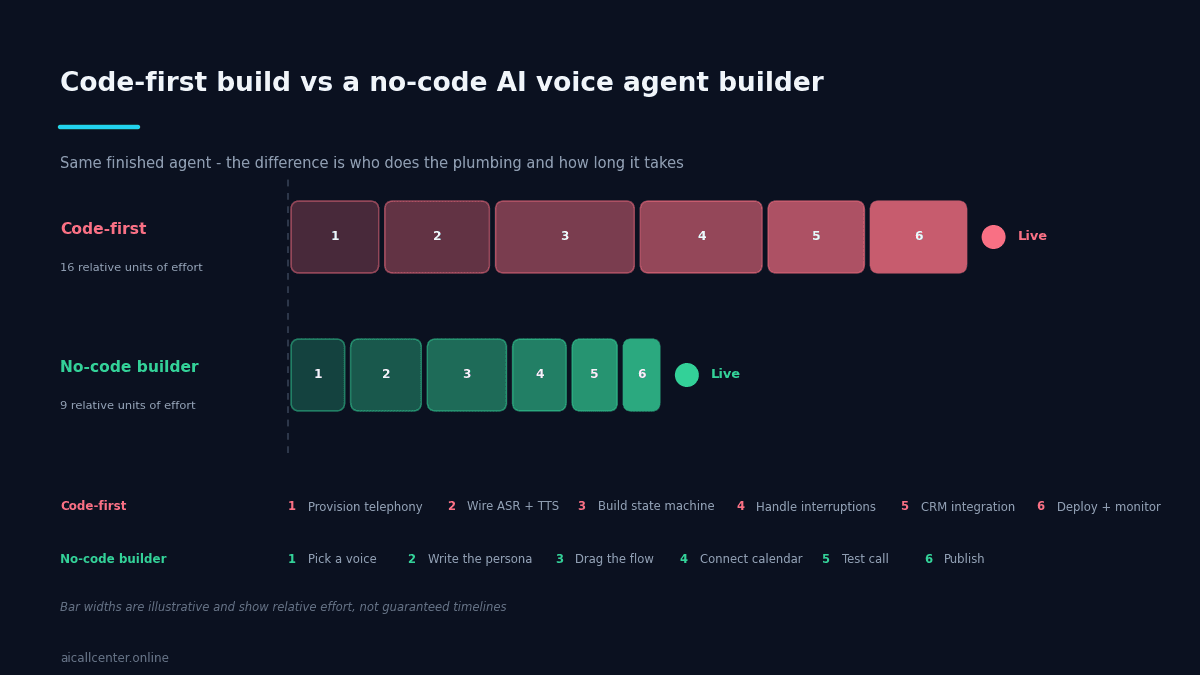
Interruption handling alone is worth the trade. Humans talk over each other constantly, and an agent that cannot be interrupted feels robotic within two exchanges. Getting that right — detecting speech onset, cutting the audio cleanly, discarding the abandoned response — is subtle work that has nothing to do with your business.
Latency is the other one. The gap between a caller finishing their sentence and the agent starting to reply determines whether the conversation feels natural. Shaving that down involves streaming, speculative generation and careful buffering. It is a permanent engineering commitment, not a one-off build.
How to Build a Usable Agent in an Afternoon
Work in this order. It is tempting to start with the flow diagram, which is the wrong place to begin.
Write the persona first. Two or three paragraphs: who the agent is, who it is speaking to, what it is trying to achieve, and what it must never do. Be specific about tone. “Friendly but efficient, does not oversell, never guesses at pricing” produces better calls than “professional.”
Then the knowledge. Load the twenty questions your team actually gets asked. Not a brochure — the real ones, with real answers, including the awkward ones about price and availability.
Then the flow. Map only the decisions that change what happens next: qualified or not, booking or callback, transfer or continue. Resist mapping the whole conversation. Modern models handle the conversational path themselves; what they need from you is the decision structure. If you want to understand what the agent is doing under the hood here, our piece on how AI contact centres determine caller intent is a useful companion.
Then the tools. Connect the calendar, the CRM, the webhook. An agent that cannot take an action can only ever be a screening layer.
Then test properly. Call it yourself twenty times and try to break it. Interrupt it. Mumble. Ask something off-topic. Say no. The failures you find in twenty test calls are the ones your customers would have found in the first fifty real ones.
How to Evaluate a Builder
Most platforms demo well. The differences show up in week three, so it is worth checking a few specific things before you commit.
Can you place a test call in under ten minutes? If onboarding requires a sales call before you can hear the agent speak, that tells you how self-serve the product really is.
How does it handle being interrupted? Talk over it deliberately during your first test. Some platforms cut cleanly, some finish the sentence regardless, and some get confused entirely. This single test predicts how the agent will feel to your customers better than any feature list.
What can the agent actually do, not just say? Check that it can call a webhook mid-conversation, read from a calendar, and pass structured data back. An agent that can only talk is a screening layer, not an assistant.
Are transcripts and outcomes exportable? You will want this data in your own reporting eventually, and finding out that it is locked behind a dashboard is an unpleasant surprise at renewal.
What happens at volume? Ask about concurrent call limits and the per-minute cost past the entry tier. Pricing that looks generous at a hundred calls a month often does not at five thousand.
Where No-Code Runs Out
Three situations warrant a custom build. Deep integration with a proprietary system that has no API is the most common. Regulated environments with unusual audit or data-residency needs are the second. And novel conversation patterns — real-time translation mid-call, multi-party negotiation — are the third.
Everything else is a configuration problem wearing an engineering costume. If your requirement is “answer calls, qualify the caller, book them in, log it” — the standard brief for an AI phone answering assistant — a no-code AI voice agent builder will get you there faster and you will maintain it more easily.
The honest caveat is portability. Your prompts, flows and knowledge are usually exportable; your integrations and phone number routing are less so. Ask about export before you build fifty agents, not after. It is also worth understanding the general capabilities and constraints of voicebots before committing to a platform.
The Realistic Bar
A no-code AI voice agent builder will not produce something indistinguishable from your best employee on day one. What it will produce, within an afternoon, is an agent that answers every call immediately, asks the right questions in the same order every time, books appointments into a real calendar, and writes an honest record of what happened.
For most businesses, that is not a compromise. It is a considerable improvement on a phone that rings out after five and a notes field nobody fills in. Start with one narrow use case, review the first hundred transcripts, and expand once the calls are ones you would happily put your name on.

Ready to see how Ai Call Center can transform your business? Build an AI voice agent with no code today or see AI voice agent pricing to find the perfect plan for your business.
Frequently Asked Questions
- Do I need any coding knowledge to use a no-code voice agent builder?
- No — the logic is configured through prompts, flow diagrams, and toggles rather than a codebase. What you do need is clarity on the business decisions: what the agent should say, when it should escalate, and what counts as a qualified outcome.
- How long does it actually take to build a working agent?
- A focused first version — persona, core knowledge, a simple flow, and calendar or CRM connection — is realistically an afternoon's work, not a multi-week project. Refining it against real call transcripts is the ongoing part.
- What should I test before trusting a no-code platform?
- Interrupt the agent mid-sentence on a test call. How cleanly it handles that single moment predicts more about real call quality than any feature list — some platforms cut cleanly, others finish regardless or get confused entirely.
- Can I export my agent if I switch platforms later?
- Prompts, flows, and knowledge are usually exportable in some form; phone number routing and deep integrations typically are not. Ask about export options before building many agents on a single platform, not after.