
How to Build an n8n AI Voice Agent Workflow (Node by Node)
Build an n8n AI voice agent workflow with five nodes. Covers the Wait node pattern, webhook payloads, error handling and rate-limiting guardrails.
Automation builders hit the same wall eventually. You can move data between forty tools in n8n without writing a line of glue code — until the next step in the process is “someone needs to actually call this person.” At that point the workflow stops being automation and becomes a task assignment.
An n8n AI voice agent workflow removes that stop. The call becomes another node on the canvas: it fires, a conversation happens, and the structured result flows into whatever comes next. No human in the middle, no CSV export, no Slack message asking someone to please ring the lead back.
This walkthrough covers the node pattern that works, why the Wait node is the piece most people get wrong, what the webhook payload should carry, and how to keep the whole thing from firing duplicate calls at three in the morning.
Why n8n Is a Good Fit for Voice Agents
Voice calls are asynchronous, and n8n handles asynchronous work better than most automation platforms. A call takes ninety seconds or four minutes. It might not connect at all. The result arrives later, out of band, from a system that has no idea what your workflow looked like when it started.
n8n’s combination of webhook triggers, a proper Wait node, and self-hosting makes that manageable. You can pause an execution mid-run and resume it when the call ends, keeping the entire lifecycle inside a single execution you can inspect. That is much easier to debug than a chain of separate runs stitched together by a database lookup.
Self-hosting matters too. Call transcripts contain customer names, addresses, payment questions and health details. Keeping the orchestration layer on infrastructure you control removes an entire category of compliance conversation.

The Node Pattern That Works
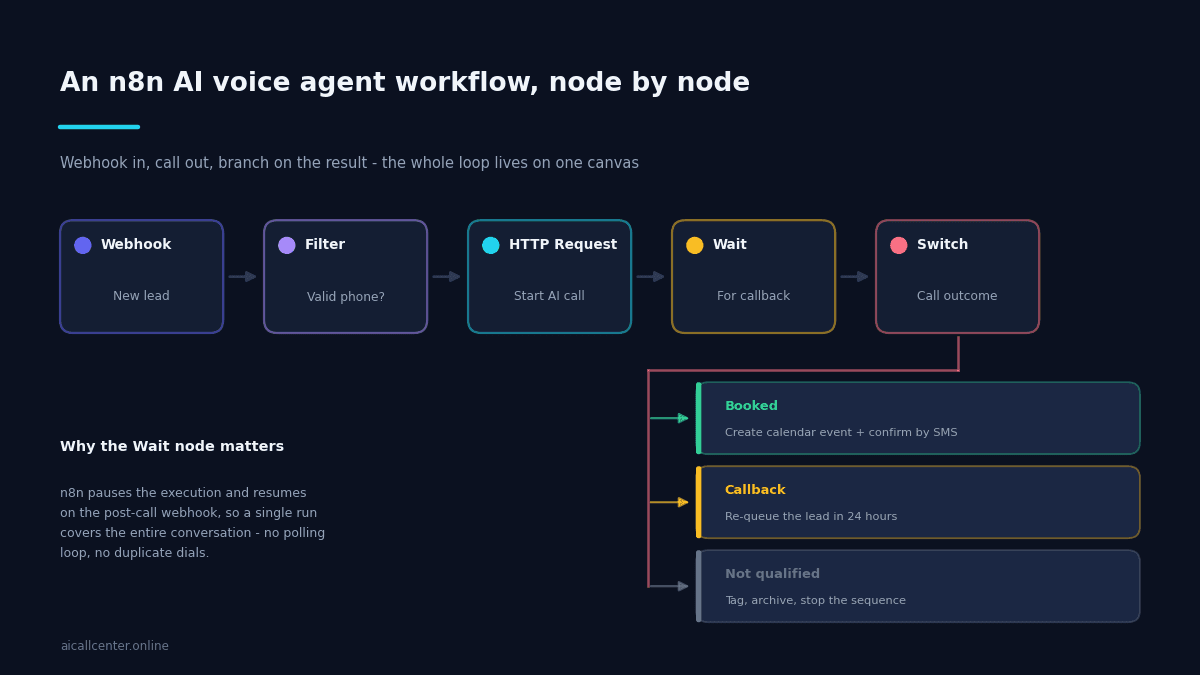
Almost every production n8n AI voice agent workflow collapses into the same five nodes, then branches.
Webhook receives the trigger — a new lead from a form, a row added to a sheet, a CRM event. Filter throws out anything without a valid, correctly formatted phone number, the cheapest way to stop wasting call minutes.
HTTP Request starts the call by posting to your voice platform’s API. Wait pauses the execution until the call completes. Switch reads the outcome and routes the contact down the right branch.
Keep the branch list short. Booked, callback requested, and not qualified will cover the vast majority of calls. Every additional branch is logic you have to maintain forever, and the temptation to add a fourth and fifth is how these workflows become unreadable.
The Wait Node Is the Important Part
This is where most first attempts go wrong. The instinct is to start the call, then poll the API every thirty seconds to see whether it has finished. That works in testing and falls apart in production: you burn API quota, you accumulate stuck executions, and eventually a race condition dials the same lead twice.
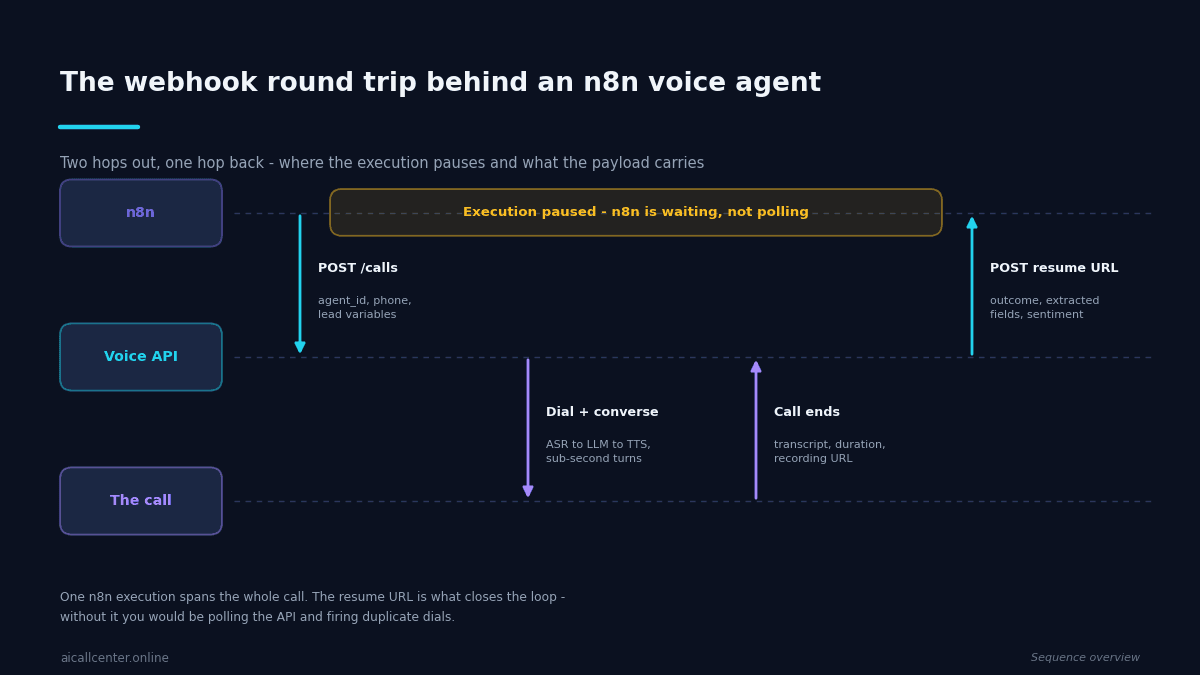
Use the Wait node in resume-on-webhook mode instead. n8n generates a unique resume URL, you pass it to the voice platform as the post-call callback, and the execution sleeps until the platform posts back. Nothing is running, nothing is polling, and the resumed execution still has every variable from before the call.
Two practical notes. Set a timeout on the Wait node so a call that never reports back does not leave an execution parked indefinitely — an hour is generous. And make the resumed branch idempotent, because a platform that retries its webhook will otherwise book the same appointment twice.
What the Payload Should Carry
Going out, the HTTP Request node should send more than a phone number. Pass the lead’s name, the source of the enquiry, and any context that changes what the agent should say — the product they asked about, the property they viewed, the invoice they queried. Personalised openings measurably outperform generic ones.
Coming back, insist on structured fields rather than a transcript alone. A good post-call webhook includes the outcome, the duration, a recording URL, the transcript, and the specific data points the agent was told to extract. If you are only getting free text back, you will end up parsing it with a regex, and that regex will break.
Store the recording URL and transcript somewhere durable in the same run. Retrieving them later is harder than saving them once. This is also the raw material for the kind of advanced call tracking that tells you which campaigns are actually producing conversations worth having.
Three Workflows Worth Building First
- Instant lead response. Form submission arrives, the agent calls within thirty seconds, qualified leads land on a calendar. This is the workflow that justifies the whole setup.
- Appointment reminders with rescheduling. A daily cron pulls tomorrow’s bookings and calls each one. Confirmations update the record, reschedules write a new slot, and cancellations free the time before it is wasted.
- List reactivation. Feed a stale contact list through in controlled batches. Because the cost per attempt is low, you can work lists no human team would ever get to — the same economics that make outbound call automation work at scale.
Handling the Failures
Voice workflows fail in ways that data workflows do not, and the default n8n error handling is not quite enough on its own.
Attach an Error Workflow to the whole thing so a thrown exception mid-call does not vanish silently. Inside it, write the contact ID and the failure reason somewhere you will actually look — a table, a Slack channel, anything but the execution log.
Then handle the three specific failure modes. A call that never connects should decrement the retry counter and re-queue rather than counting as a completed attempt. A call that connects but returns no structured data usually means the agent went off-script, and those transcripts are the most useful ones you will read. And a webhook that arrives twice — which happens more often than platforms admit — must not create two calendar entries, which is why the resumed branch needs to check for an existing booking before it writes one.
Build these in from the start. Retrofitting idempotency after a live workflow has double-booked a customer is a bad afternoon.
Guardrails That Prevent Expensive Mistakes
Rate limit deliberately. n8n will happily fire two thousand calls in a minute if you let it, and your carrier will notice. Batch the executions and space them out.
Enforce calling hours in the workflow rather than trusting the trigger. Check the contact’s timezone against a permitted window and re-queue anything outside it. This is a legal requirement in many jurisdictions, not a courtesy.
Keep a suppression list and check it before every dial. Do-not-call requests, completed customers, and anyone who has already been contacted this week all belong in it. Add a per-contact attempt counter so a retry loop cannot quietly become harassment.
Finally, log every outcome to a datastore you can query. When someone asks how many calls connected last month, you want an answer from a table, not from scrolling execution history.
Frequently Asked Questions
- Why use n8n instead of a platform-native integration?
- Control over what happens either side of the call. n8n lets you enrich the lead before dialling, branch on the outcome across several systems, and retry on your own terms — useful when the call is one step in a longer process rather than the whole process.
- Do I need the Wait node?
- Only if the rest of your workflow depends on the call outcome. A call takes minutes, so the cleaner pattern for most builds is to trigger the call and let a webhook resume the workflow when the result arrives, rather than holding an execution open.
- How do I stop the workflow dialling the same lead repeatedly?
- Guard it in two places: a rate limit on the workflow itself, and a field on the contact record that the workflow checks before dialling and updates after. Retry logic without a contact-level guard is how accounts end up making six calls in an afternoon.
- What should the webhook payload contain?
- The phone number, the contact identifier you will write results back to, and any context the agent needs to sound informed — the service enquired about, the property, the appointment being confirmed. Keep the outcome list that comes back short: five states is usually enough.
Where to Start
Build the instant lead response workflow first with a test number and no real contacts. Watch ten calls end to end, read the transcripts, and fix the instructions before you point it at a live list.
The technical part of an n8n AI voice agent workflow is straightforward — five nodes and a webhook. The work that determines whether it succeeds is deciding what the agent should ask, when it should hand off to a person, and what counts as a lead worth booking. If you are still weighing up whether automated calling suits your use case at all, our overview of bot calling with a phone is a good place to start. Get that right on paper first, and the canvas takes an afternoon.
For the wider context around this build — what the stack is made of, what it costs per minute, and which workflow to automate first — see the complete guide to AI call center software.
Ready to see how Ai Call Center can transform your business? Try the n8n AI voice agent integration today or see AI voice agent pricing to find the perfect plan for your business.