
GoHighLevel AI Voice Agent Integration: A Practical Guide
How a GoHighLevel AI voice agent integration works, which workflows to automate first, and the setup mistakes that make agencies switch it off.
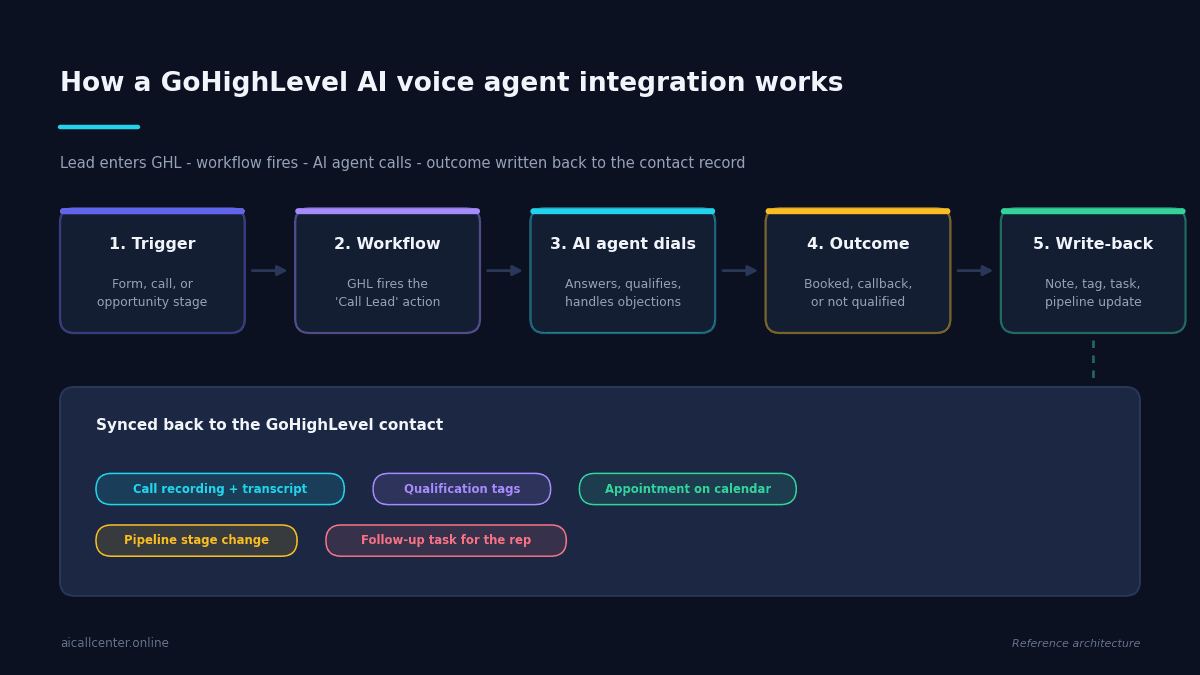
Most GoHighLevel accounts leak leads in the same place. Someone fills in a form at 9:40pm, the workflow tags them, fires an SMS, drops them into a pipeline stage — and then waits for a human to pick up the phone in the morning. By then the lead has filled in three more forms on three other websites.
A GoHighLevel AI voice agent integration closes that gap by making the phone call part of the workflow itself. Instead of the automation stopping at “notify the rep,” it dials the lead, holds a real conversation, qualifies them, books the appointment, and writes the outcome back to the contact record before anyone on your team opens a laptop.
This guide covers what the integration actually does, how the pieces connect, which workflows to automate first, and the setup mistakes that make agencies switch it off after a week.
What a GoHighLevel AI Voice Agent Integration Actually Does
GoHighLevel is very good at everything around a phone call: capturing the lead, tagging it, sequencing the follow-up, tracking the pipeline. What it cannot do on its own is have the conversation. That has always been the human-shaped hole in the middle of an otherwise automated funnel.

An AI voice agent fills that hole. It plugs into GHL as an action inside a workflow, the same way an SMS or email step does. When the workflow reaches that step, the agent places a call, speaks naturally with whoever answers, follows the qualification logic you defined, and returns structured data — not just a recording, but fields you can branch on.
The important word there is structured. A voicemail drop gives you a delivery status. An AI voice agent gives you “budget confirmed, timeline is 30 days, wants a Tuesday callback, sentiment positive” as data that the rest of your GoHighLevel automation can act on.
How the Integration Works, Step by Step
The architecture is simpler than most people expect. There are five moving parts, and only two of them need configuration.
- The trigger. A form submission, an inbound missed call, a pipeline stage change, or a tag being applied. Anything GoHighLevel can already trigger on can start a call.
- The workflow action. Your workflow hits a step that hands the contact to the voice agent — usually a webhook or a native action carrying the phone number plus any custom fields the agent should know about, like the property they enquired on or the service they requested.
- The conversation. The agent dials, greets the lead by name, and works through its instructions. Good agents handle interruptions, repeat information when asked, and transfer to a human when the caller requests it.
- The outcome. Every call ends in one of a small number of states — booked, callback requested, not qualified, no answer, wrong number. Keeping this list short is what makes the downstream automation manageable.
- The write-back. The agent posts the result to GoHighLevel: a note with the transcript, tags reflecting the qualification, a calendar event if an appointment was set, a pipeline move, and a task for the rep if human follow-up is needed.
Steps two and five are where your configuration effort goes. The rest runs itself.
Where It Beats Manual Follow-Up
The case for automating the call is not that AI talks better than your best closer. It does not. The case is that your best closer is asleep, on another call, or already three days behind on the lead queue.
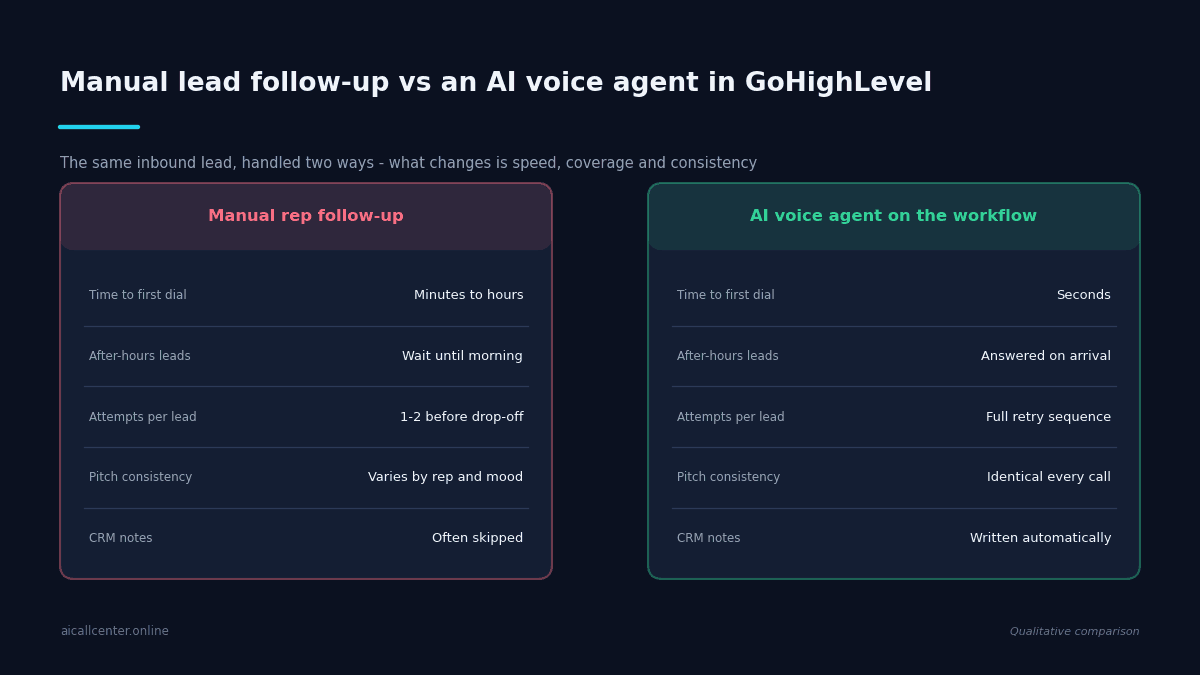
Three differences matter most in practice. Speed to first dial collapses from minutes or hours down to seconds, which is decisive when the same lead has enquired with your competitors. Coverage becomes total, so a Saturday evening enquiry gets the same treatment as a Tuesday morning one. And consistency stops being a training problem — every lead hears the same qualifying questions in the same order, which is also what makes your reporting trustworthy.
There is a fourth benefit that agencies underrate: the CRM finally reflects reality. Reps skip notes. Agents never do. If you have ever tried to run advanced call tracking on a pipeline where half the activity was never logged, you know how much that is worth.
Five Workflows Worth Automating First
Do not try to automate everything at once. These five deliver the most return for the least configuration:
- Speed-to-lead. New form submission triggers an immediate call. This is the single highest-value automation in most GoHighLevel accounts.
- Missed call rescue. An inbound call goes unanswered, and the agent rings back within a minute rather than sending a text nobody replies to.
- Database reactivation. Work a list of cold contacts that no human will ever have time to call. This is where outbound call automation pays for itself fastest.
- Appointment confirmation. Call the day before to confirm, reschedule, or release the slot, which cuts no-shows without a rep touching it.
- Stalled pipeline nudges. When an opportunity has not moved in fourteen days, the agent calls to find out why and updates the stage accordingly.
Each of these maps to an existing GoHighLevel trigger, so you are adding one step to a workflow you already have rather than building something new.
What to Set Up Before You Turn It On
The agencies that get good results treat the first two weeks as calibration, not deployment.
Start by writing the qualification criteria down explicitly. If you cannot list the four or five things that make a lead worth a rep’s time, the agent cannot either — and you will get transcripts full of pleasant conversations that decide nothing. Our guide to AI calling agents for lead management covers how to structure this.
Then define the transfer rule. There should always be a clear condition under which the agent hands off to a human, and the caller should be able to trigger it just by asking. Agents that refuse to pass a call along generate complaints.
Finally, set the retry policy and respect calling hours. Contact rates improve with a sensible retry sequence, but an agent that dials six times in an afternoon will damage your sender reputation and your brand at the same time.
Common Mistakes
Three problems account for most failed rollouts. The first is scripting the agent too tightly, which produces something that sounds like an IVR menu reading a paragraph. Give it goals and guardrails rather than a word-for-word script.
The second is skipping the outcome taxonomy. If the agent can return twenty different result strings, your workflow branches become unmaintainable within a month. Five states is usually enough.
The third is never listening to the recordings. The first fifty calls will surface objections and phrasings you did not anticipate. Reading those transcripts and tightening the instructions is the whole game — and it is also where you learn the honest limits of what an agent can and cannot handle.
Frequently Asked Questions
- What is an AI call center agent?
- An AI call center agent is a voice agent that places or answers phone calls on your behalf. Inside GoHighLevel it behaves like any other workflow action: it dials the contact, holds the conversation, follows your qualification logic, and returns a structured outcome your automation can branch on rather than just a recording.
- Does the AI voice agent write back into GoHighLevel?
- That is the part worth checking before you buy. A proper integration posts a note with the transcript, applies tags reflecting the qualification, creates the calendar event if an appointment was set, moves the pipeline stage, and opens a task when a human needs to follow up.
- Which GoHighLevel workflow should I automate first?
- Speed-to-lead. A new form submission triggers an immediate call instead of waiting for a rep in the morning. It is the highest-value automation in most GoHighLevel accounts because the same lead has usually enquired with competitors too.
- Can the agent transfer a call to a human rep?
- Yes, and it should. Define one clear transfer condition and always let the caller trigger a hand-off just by asking. Agents configured to refuse a transfer generate complaints faster than any other setup mistake.
Getting Started
A GoHighLevel AI voice agent integration is not a replacement for your sales team. It is a way to make sure that every lead gets a real conversation within seconds, that nothing sits in a queue overnight, and that the CRM tells you the truth about what happened.
Start with one workflow, one clear qualification standard, and one transfer rule. Review the transcripts weekly. Add the next workflow once the first one is producing appointments your reps are happy to take.
If you are earlier in the process and still deciding whether voice agents belong in your stack at all, start with the complete guide to AI call center software, which covers the layers underneath this integration and how the category is priced.
Ready to see how Ai Call Center can transform your business? Try the GoHighLevel AI voice agent integration today or see AI voice agent pricing to find the perfect plan for your business.